Drawing API for the MAP Window
CANoe Quick Tip

Did you know that there is an API available which allows you to draw your project-specific data yourself at a specific position in the MAP window? No? Then try it out. The feature allows you to mark, for example, positions on the map where your ECU does not behave as expected. This helps to recover the position and therefore the situation.
What Can You Do With This Function or Workflow? What Problems Does It Solve?
Let’s use an example: You do a test drive with your new ADAS function. But for some reason the log file shows you afterwards that the function was not available at any time.
For the next test run you prepare a few lines of CAPL code, which draw a simple “X” at the current position on the map where the function turns off, with the additional text “AutoBrake Turned Off”.
You find out that the “X” is drawn when a tunnel was entered → this helps you to have a better understanding of the situation and allows you to analyze the problem faster.
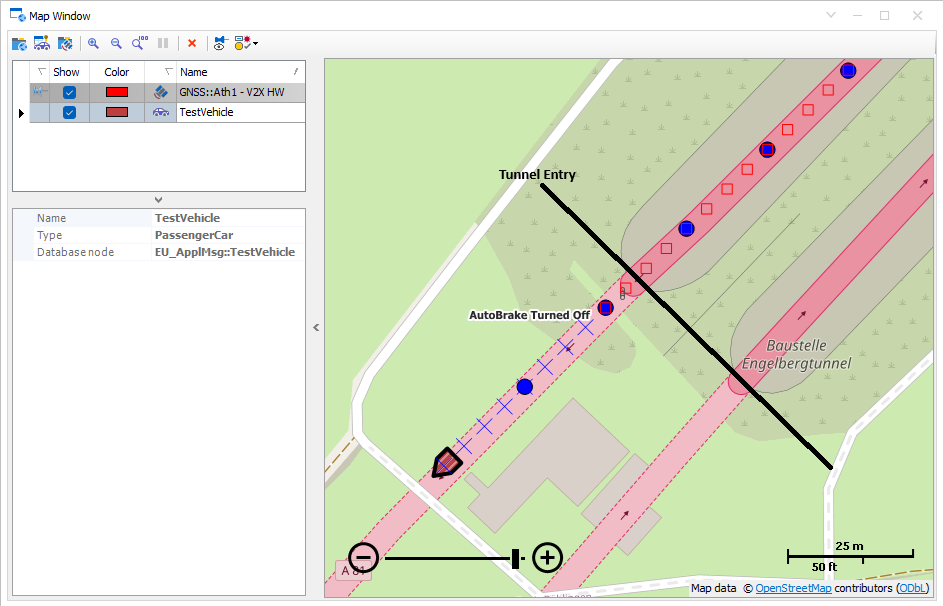
Where Can You Find This Function in CANoe? | How to Start the Process?
The MAP Window API is available in CAPL. There is a help site for the CAPL functions: CAPL Functions | Map Window API.
There are functions like CreateMapObject(…) to create objects like Lines, Rectangle, Ellipse, Cross, Text, Bitmap,… . The objects can be set at a specific position, with a defined color and size. Via handle the objects can be managed, positions adjusted or in the end deleted.
Related CANoe Topics