Turn complex engineering tasks into simple prompts. The CANoe AI features support you to analyze configurations, investigate logs, create CAPL code, and automate complete testing workflows using natural language. AI agents autonomously execute tasks in CANoe, identify relevant findings, and guide you to the next steps. This reduces manual effort, shortens development cycles, and enables both experienced CANoe users and newcomers to work more efficiently.
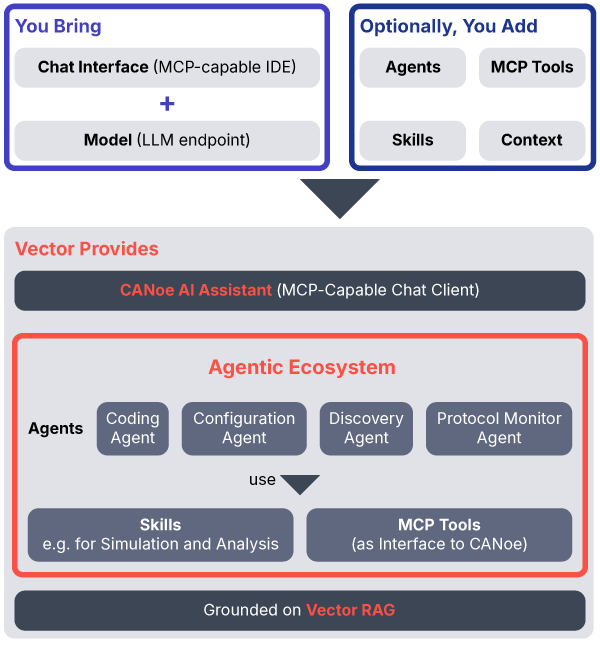
You continue to use your existing LLM, such as the one behind GitHub Copilot or Claude, while Vector provides the AI layer consisting of agents, skills, and MCP tools.
Your Benefits
- Complete your engineering tasks faster by turning manual multi-step workflows into AI-assisted processes driven by natural language.
- Reduce routine work with AI agents that automatically generate, execute, analyze, and refine test scenarios.
- Find issues more quickly through intelligent analysis of logs, reports, network traffic, and CANoe configurations.
- Increase productivity at every user level by making advanced CANoe functionality reachable through simple prompts.
- Stay in control of your data and workflows with transparent AI interactions and the freedom to use your preferred AI endpoint.
How It Works
Bring the AI you already use to the CANoe Agentic Ecosystem.
Getting started is simple.
You bring your endpoint — the same one behind your GitHub Copilot, Claude, or in-house LLM. Use it from VS Code, the Vector chat client, or any IDE with a compatible MCP client. The connection to the CANoe MCP Server happens automatically.
Vector provides the agentic ecosystem.
The Discovery, Project, Simulation, Coding, and Analysis Agents work with skills and MCP tools. Behind them is the Vector RAG. It grounds the agents in Vector's knowledge base and documentation, so answers rely on Vector's expertise rather than guesswork of the model. The ecosystem remains open, allowing you to bring in your own agents, skills, MCP tools, and context to tailor it to your needs.
Your Feedback
Your feedback helps us shape the future of AI-assisted workflows in CANoe. We would like to know your feedback on the new AI and MCP features. Let us know what works well for your use cases, where you see room for improvement, and which capabilities you would like to see in future releases.
From Requirement to Reviewed Results
Using the CANoe Agentic Ecosystem, you can accelerate your workflows. After receiving a new requirement, an agent turns it into CAPL test code, executes it in CANoe, analyzes any failures, repairs the code, and reruns the test. When the workflow is complete, it hands you the exact scenario to review, with the relevant CANoe windows already synchronized.
Describe Your Task – The Agents Handle The Implementation
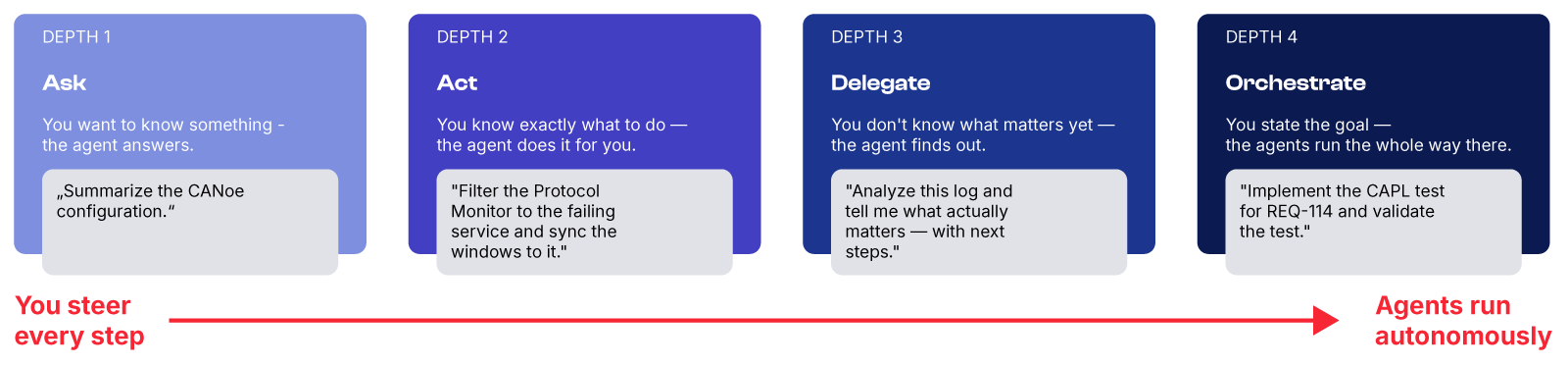
You choose how much you hand over — from a single question to a fully orchestrated run, and everything in between. The agents work out which capabilities the task needs and chain them for you.
The examples in the following videos are using VS Code, GitHub Copilot, and CANoe.
Build CANoe Simulations in Minutes
Speed up Your Testing Processes
Analyzing Communication Issues Faster
From Test Specification to Test Implementation
Human in the Loop: The Agents Work and You Decide
Autonomy doesn't mean being out of sight. Every run is transparent, and every result is delivered to you. You always have the choice of how much to delegate.
Every step is visible
You see live, which MCP tools the agent calls, which skills it uses, and what it changes in your IDE and in CANoe.
Results come to you
The agents analyze and report back with concrete next steps and CANoe views synchronized to what matters. They are prepared for your judgment, not instead of it.
You set the depth
Ask, act, delegate, or orchestrate — the same system serves all four purposes. Move along the scale whenever you choose.
Wondering What's Possible With Your Configuration? The Discovery Agent Will Tell You
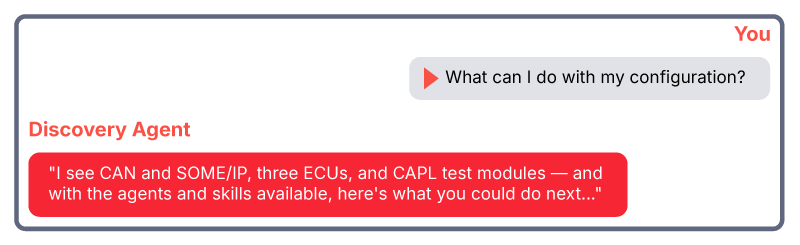
Your setup — your buses, your ECUs, your code — opens its own possibilities. Load your configuration and let the Discovery Agent explore them with you. It reads what's there, knows which agents and skills are at hand, and derives what you could do with them
Use Our Agents, Adapt Them, or Build Your Own.
The agents and skills we provide are just starting points. Adjust them to your workflows or write your own agents using the same tools. We enable you to bring this into your workflow. Get in touch and discuss your use cases with us.

Your Next Steps
Try It Today!
The CANoe MCP Server is available now in CANoe 20 SP 2. Connect your MCP client, load a configuration, and send your first prompt.

Learn More About CANoe
CANoe is Vector's versatile tool for developing, simulating, analyzing and testing individual software components, subsystems, electronic control units (ECUs), and entire distributed networks.