Diagnostics in the E/E Development Process and in Software Factory
The diagnostic implementation of an ECU is often developed independently from the ECU´s application software: Different user groups (in different roles) use independent software tools to create the different development artefacts as input for the configuration of the vehicle (diagnostic) software - typically even at different points of time.
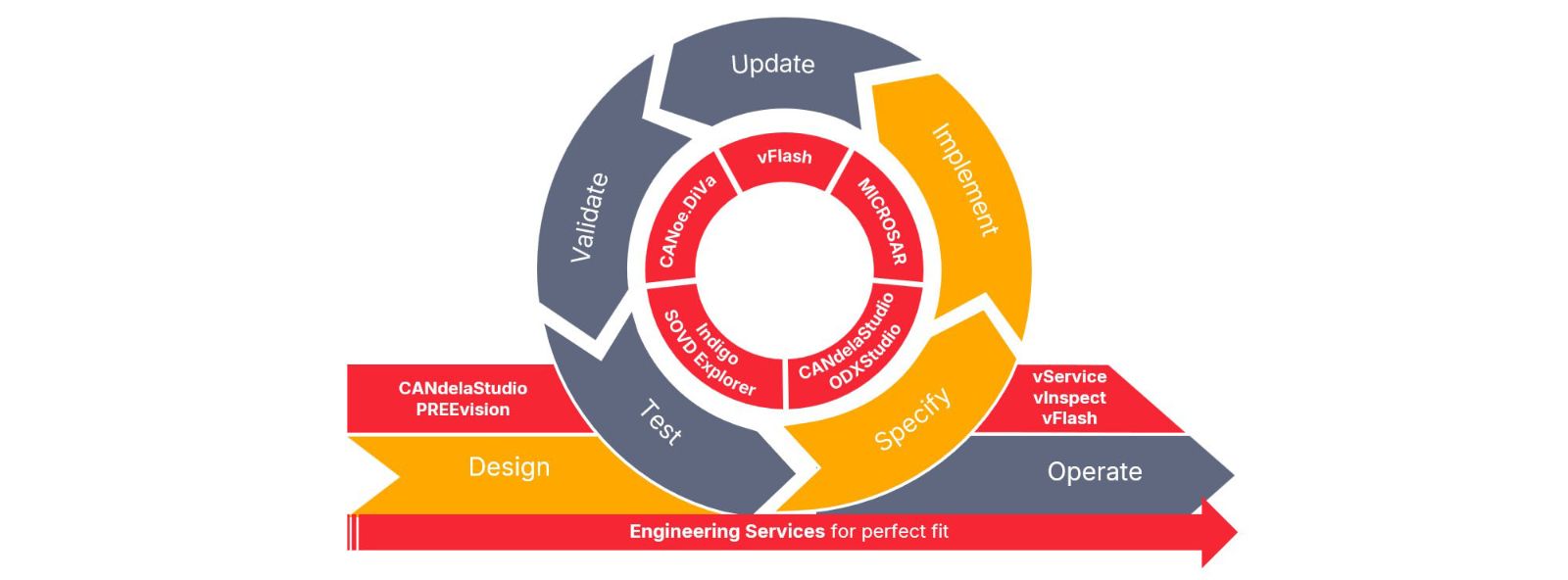
Ensuring the consistency between diagnostics and application software is essential because each inconsistency leads to problems in diagnostics which are hard to find and to pinpoint.
An integrated, model-driven approach for the development of both diagnostics and the vehicle application makes it possible to generate diagnostic descriptions fitting to the application software components and to process them in an automated way (e.g. in CI/CD pipelines).
Development Process
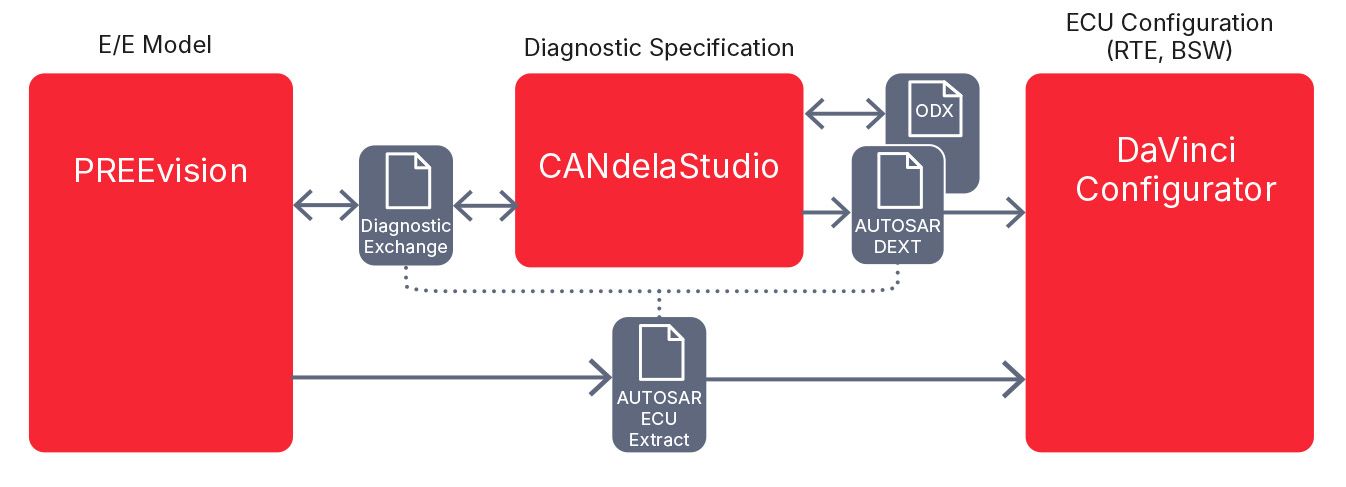
PREEvision models the entire E/E architecture of a vehicle (platform). Besides many other aspects (such as software, hardware and communication …) it is also possible to define the diagnostic capabilities of the contained ECUs together with the application software components providing the diagnostic data in one single model. This approach guarantees the consistency of diagnostic data exported from this model with an AUTOSAR ECU system description, which can also be exported from the same model. The diagnostic data is then further refined and supplemented within CANdelaStudio.
The AUTOSAR Diagnostic Extract (DEXT) and tester parameterization formats (such as Open Diagnostic-data Exchange ODX) are exported by CANdelaStudio. To configure AUTOSAR diagnostics, the DEXT is read into DaVinci Configurator. Based on the DEXT, DaVinci Configurator generates the AUTOSAR diagnostic basic software modules (DCM and DEM). Diagnostic mappings in the AUTOSAR DEXT are used to autoconnect the generated ports of the basic software to its counterparts in the application software.
Advantages
- End-to-end consistency between diagnostic data and software component descriptions.
- Faster development cycles are achieved through automatic synchronization and merging when modifications are made.
- High degree of automation in the software configuration: No need to do a manual port mapping.
- Consistent DEXT and ODX data: Both are generated from the same source.
Video Highlight
Automating a Diagnostic Development Workflow in a Pipeline
In this video, we will guide you through a complete diagnostic development workflow, automated in a pipeline optimized for fast and error-free integration. The pipeline includes local design and implementation steps on the engineer’s PC as well as four server-based build jobs: Diagnostics Design, Build Diagnostic Specification, Build ECU, Test and Build Tester Data.
Software Factory
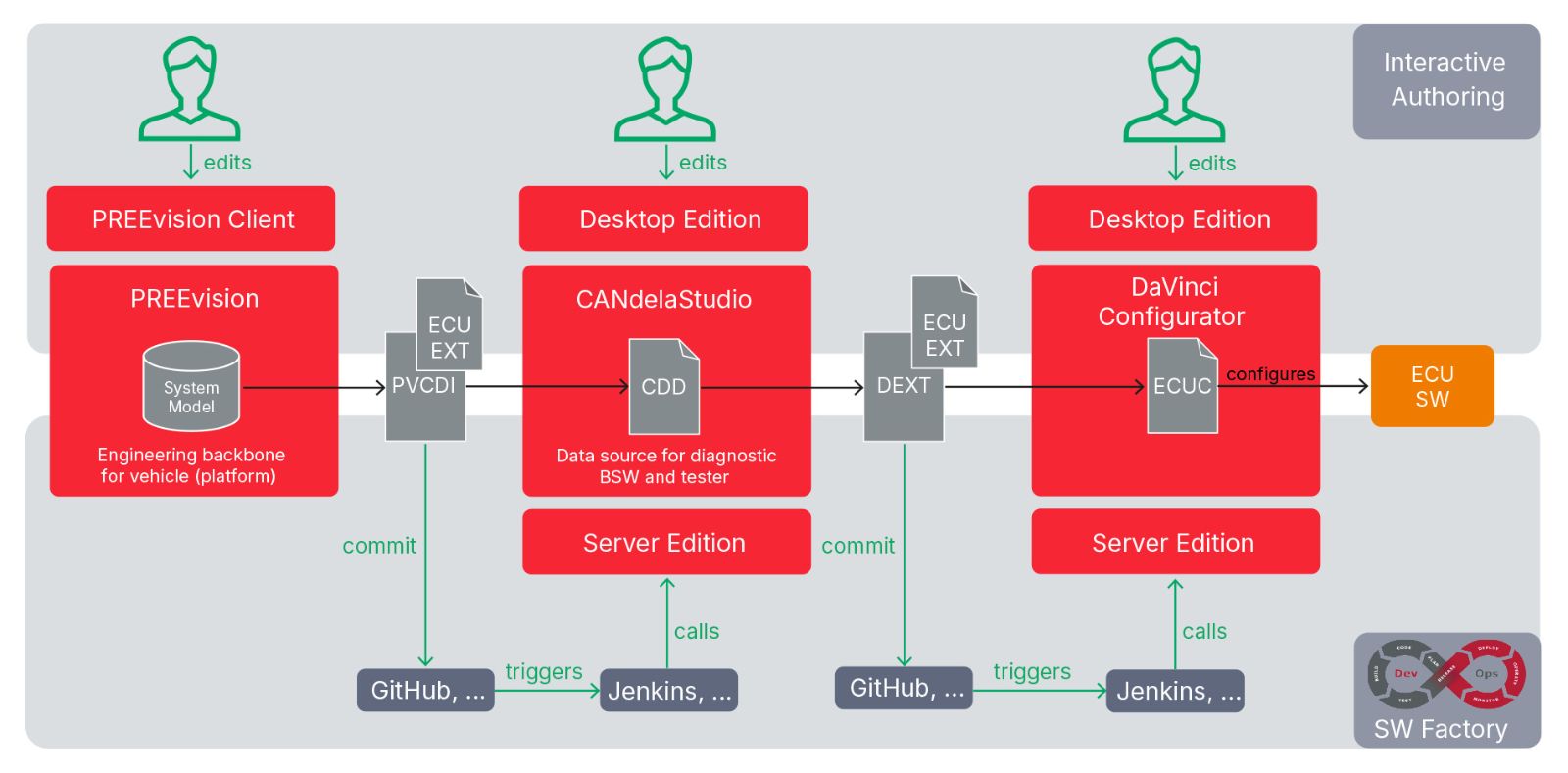
Vector offers "Server Editions" of the products for integration into automated CI/CD/CT pipelines.
Specification changes are propagated and synchronized between application, diagnostics, and tester data development - fully automated.
This leads to
- faster delivery of software updates in short DevOps cycles,
- higher quality as human errors are excluded,
- reduced efforts,
- easy integration in CI/CD/CT pipelines.
Related Content
Integrate Diagnostics into Your System Design
CANdelaStudio
DaVinci Configurator Classic